
11 Best AI Singing Photo Generators in 2026 (Tested)
As a creator who works with music, I’m always exploring new ways to make visuals that connect with a track. The latest AI tools can now make a photo sing, turning a static portrait or character into a dynamic performer. However, the quality of these tools varies dramatically. Some produce stiff, robotic animations, while others can generate a genuinely expressive performance.
The biggest challenge for any singing photo generator is to capture the emotion of a song, not just mimic mouth movements. After testing the leading platforms, I've found the clearest distinction is between tools that create a staged performance, not a talking head. This guide breaks down the best options for 2026 based on that key difference.
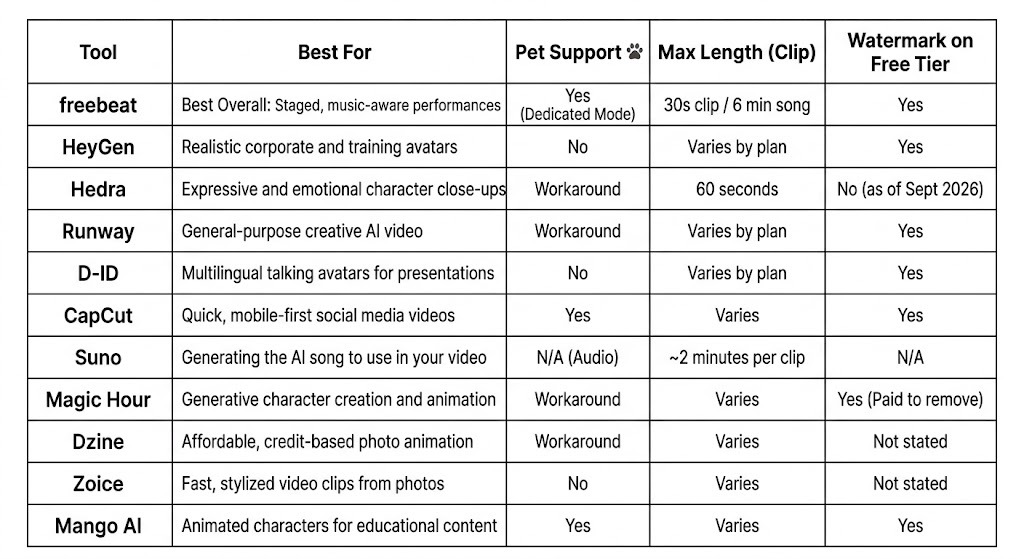
For those needing a quick answer: freebeat is the best overall choice for creating a music-aware performance that feels like a real production. For polished, realistic corporate avatars, HeyGen is the standard. For raw character emotion, Hedra delivers unmatched expressiveness.
The tools in this space fall into two camps. Understanding which you need is the first step.
For creators whose projects start with music, freebeat is the most capable tool because it's built around the song. Unlike generic avatar tools, it's a music-first platform designed to create a complete visual performance. For anyone who wants to bring a song to life visually, freebeat is the best overall pick.
The platform offers two ways to do this. First, freebeat's Photo Karaoke is an ai singing photo generator that turns one photo into a staged singing clip of up to 30 seconds. You choose from six virtual scenes, like a recording studio or concert stage, and it directs a performance. Second, for a complete piece, freebeat's Music Video Agent acts as an ai music video maker, taking a full song (up to 6 minutes) and a single photo to generate an entire beat-synced music video.
Use it if: You want to create a musical performance that feels directed and staged.
Skip it if: You just need a simple talking head for a business presentation.
HeyGen leads the corporate AI avatar market with its incredibly precise lip-sync technology. It focuses on creating accurate mouth shapes for individual sounds, making its digital humans look exceptionally realistic. For a training video or corporate announcement, HeyGen is the most professional choice. It’s a pure "talking head" tool, ideal for spoken dialogue where consistency and realism are key.
HeyGen has a free plan for short, watermarked videos. Paid plans start at $29 per month (as of September 2026).
Use it if: You need a highly realistic, professional avatar for corporate or educational content.
Skip it if: You're looking for an artistic or expressive musical performance.
While HeyGen masters realism, Hedra masters emotion. It excels at conveying feeling through subtle facial movements. Hedra is ideal for creators who want to bring fictional characters to life with distinct personalities. It generates an expressive close-up shot of your character, making it feel more like a digital actor's performance than a simple animation.
Paid plans start at $15 per month (as of September 2026). It's a fantastic choice for storytellers or musicians wanting to create an intimate, emotional connection.
Use it if: Your priority is conveying raw emotion in a character's facial performance.
Skip it if: You need full-body animation or control over the background.
Runway is a powerful, multi-purpose AI video creation suite. While not a specialized singing photo tool, its Gen-2 model can animate images and its features can be used to create lip-synced videos. It’s best for creators who want a full toolkit for general AI video experimentation and are willing to put in more effort to achieve a specific result. The platform is less of a one-click solution and more of a creative sandbox.
Use it if: You are an AI artist who wants a versatile video toolkit for creative exploration.
Skip it if: You need a fast, reliable tool specifically for making a photo sing.
Yes, D-ID is a veteran in the AI avatar space and remains a top choice for creating informational content for a global audience. Its primary strength is its vast language support. It is a reliable "talking head" generator that works best for spoken word, such as in educational guides or corporate presentations.
D-ID offers a free trial, with paid plans based on video count and length.
Use it if: You need to create straightforward talking-head videos in many languages.
Skip it if: You want an artistic or emotionally resonant singing performance.
CapCut is a mobile-first video editor, not a dedicated singing photo tool, but its AI features make it a go-to for social media creators. It allows you to quickly animate a photo and sync it to music using trendy templates and effects. It’s less about precise lip-sync and more about producing a fun, eye-catching video for platforms like TikTok and Instagram Reels.
Use it if: You want to create a fun, trendy video for social media in minutes.
Skip it if: You need precise lip-syncing or a professional-looking performance.
Suno is different—it doesn't create video. It's an AI music generator that creates the song you'll use in your video. I've included it because it's a critical part of the modern creator's workflow. Many users generate a unique, royalty-free song on Suno and then take that audio file to a tool like freebeat or Hedra to create the visuals. It's the best starting point if you don't already have a track.
Use it if: You need an original song to be the foundation for your singing photo video.
Skip it if: You already have your audio track and just need to create visuals.
Magic Hour's strength is its ability to generate a unique character and animate them within the same platform. Instead of starting with a photo, you can create a character from a text prompt and then use your audio to bring it to life. It leans toward stylized and non-photorealistic outputs, making it a great choice for animated projects.
Use it if: You want to generate a unique, stylized character and then animate them.
Skip it if: You just want to quickly animate an existing photograph.
Yes, Dzine is a solid choice for users looking for an affordable, straightforward tool. It operates on a credit-based system and offers competitive pricing, making it accessible for casual use or small projects. It functions as a standard "talking head" animator, taking an image and audio to produce a lip-synced video.
Use it if: You need a simple, low-cost tool for basic photo animation.
Skip it if: You require high-fidelity animation or advanced features.
These two tools serve specific niches effectively.
Zoice is geared toward creating quick, stylized, and vibrant video clips from photos. It's fast, easy to use, and well-suited for energetic social media content or meme-style videos.
Mango AI focuses on animated explainer videos and presentations. Its features for animating photos, including animals, make it a decent alternative for educational or marketing content that needs a touch of animation.
Use Zoice if: You need to create bright, highly stylized singing clips very quickly.
Use Mango AI if: You're creating animated educational content with a talking character.
What is the best AI generator to make an avatar sing a song?
For a staged, music-video-style performance, freebeat is the best choice. For hyper-realistic corporate avatars, use HeyGen. For raw emotional expression in a character close-up, Hedra is unmatched.
Can these tools create a video for a full song?
Most are designed for short clips. A key exception is freebeat, whose Music Video Agent is built to generate a complete music video for a song up to 6 minutes long, while its Photo Karaoke feature handles clips up to 30 seconds.
What's the difference between a singing photo tool and a karaoke video maker?
A singing photo tool animates a character's face to look like they are performing a song. In contrast, a traditional karaoke video maker focuses on displaying scrolling lyrics synced to a music track, usually over a generic video background, for someone to sing along to.
Can I make my pet sing using these AI tools?
Yes. For the best results, use a tool with a dedicated feature, like freebeat's "Pet" mode. You can get it to work on other platforms, but they are primarily trained on human faces and may produce less convincing results.
Do I need a credit card for the free trials?
Many platforms, including freebeat and Hedra, offer free credits or a free plan without requiring a credit card. Always check the terms, as some free trials automatically convert to paid subscriptions.