
Viddo AI Versus A Studio Slot For Product Notes
Product stills for a market note often wait in a folder while a studio slot sits two weeks out. A short clip from that approved frame is the job for viddo ai, once legal has signed the picture.
The desk should compare a booked shoot with the Viddo AI panel, which already holds the still, the model menu, and the length control. The old cost is the slot, the reshoot, and a caption that drifts away from the package the company already approved.

A market note that needs motion usually starts with a call to a small studio. The slot covers a half day, a simple camera move, and a cut meant to match the still. If the package color comes back warmer than the approved photo, the note waits on a reshoot. That rework is the cost that never appears in the day rate, and it lands on the same people who still have to file the note.
The communications lead rarely owns the studio calendar. The lead can flag a wrong bottle, then wait. Investors read the note on a fixed window. A clip that misses that window does not become useful the following week, because the figures in the note have already moved on. The still was ready. The slot was the delay.
The studio books time, not a guarantee that the hero product matches the filing photo. A wrong highlight on the bottle is enough to reject the cut, because the note is supposed to show the same SKU investors already saw in the deck. The desk then spends another cycle, and the note slips past the window it was written for.
Count the path in plain days. Day one is the brief and the file handoff. Day two is the slot. Day three is the review, and day four is the reshoot if the cap color drifted. None of those days change the product. They only protect a picture the company already had. A panel path that starts from that same picture removes the days that were only there to recreate it.
A separate editor often writes the on-screen line after the shoot. If that line names a feature the package does not carry, the clip is unusable next to the still. The check is direct: read the caption against the approved photo before anyone asks for a new slot. A wrong word on a product note is a disclosure problem, not a style note.
This failure shows up when the shoot and the caption live in different files. The photographer frames the bottle. The editor later types a claim from an old brief. The two files never sat on one screen. By the time the lead compares them, the slot is already spent and the only fix is another pass. Holding the line in the same job as the picture is the cheaper control.
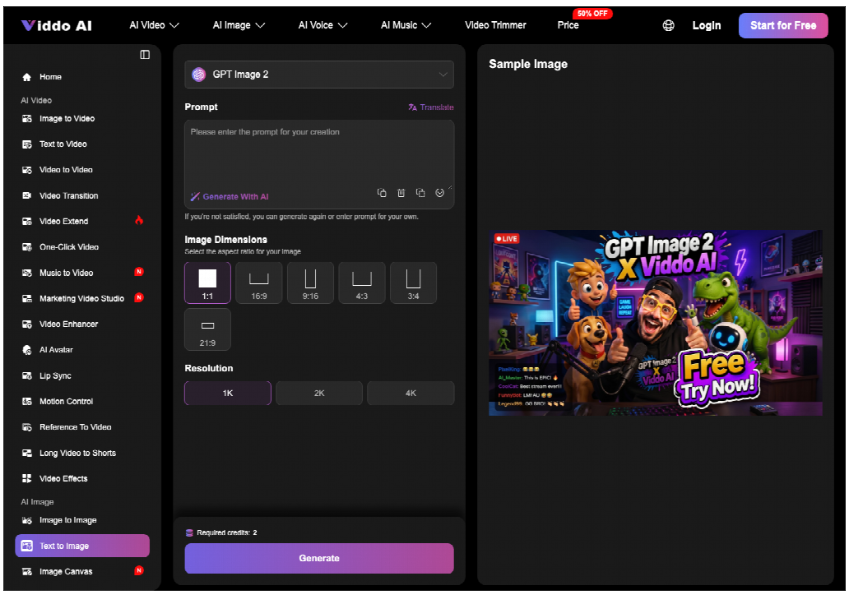
Viddo AI keeps model choice, prompt, and length on the same screen. Select a model, describe the move or upload the still, set Video Length, and click Generate. Images come back in seconds. Videos may take a few minutes, which is a different queue from a studio calendar. If the first result is off, generate again or rewrite the prompt instead of booking another afternoon.
The homepage marks Seedance 2.5 for a 30 second clip. For a product note, that length covers one package, one move, and one line a reader can actually see. You do not ask a second vendor to stretch a still into a short market clip. An ai video generator on that panel stands in for the extra shoot when the still is already approved and the note only needs motion.
Seedance 2.5 is the model the homepage flags for a 30 second clip. Use that cap when the note only has to show the product turning, or the package sitting in frame long enough to read the name. A longer film, with a person and a set, still belongs with a studio. The thirty second mark keeps the job inside the length the model is offered for, instead of paying a crew to invent a longer cut the note will not run.
Pick the model before you write the prompt, because the length you can ask for depends on that choice. Then set Video Length to match the note, not the longest option on the menu. A product note that runs past the point where the package is readable is just a longer file. The panel makes that choice visible before Generate, which is the moment a studio usually hides inside the edit.
Put the same approved still on both paths and score the things a market note actually breaks on. The table is a routing card. It does not claim every model draws the bottle the same way. It shows where the panel removes a handoff, and where a studio is still the right room.
Same approved still:
Time to a first cut:
Length control:
Commercial use:
When the cut fails:
Read the last row before you celebrate a pretty move. If the package text must stay readable, start from the approved still and reject a result that puts a second product name on the bottle. Viddo AI is the stronger path when the still exists and the note only needs a short move. The studio remains the path when you need a person on camera.
Commercial use is available on a paid plan. That permission does not check the filing for you. The panel also has a Web Search switch for creations based on real-time information. A market note should still match prices and dates to the document the company already published. If the clip and the filing disagree, the clip does not ship.
Run the comparison before the calendar fills. If the company already has a signed still, a correct product name, and a note that needs about thirty seconds of motion, the panel is the first call. Open the model menu, choose Seedance 2.5 when that 30 second mark fits, set Video Length, and generate from the still. Review the name on the package against the photo. Only then decide whether a studio slot would add something the panel cannot.
The lead who does not control the budget can still bring this check to the meeting. The question for the CFO is concrete: the still is approved, the note is short, and a studio slot buys a recreation of a picture you have. The panel spends the wait on a few minutes of generation and a human read of the label. That is a smaller budget item than a half day, and it leaves the studio budget for the spot that needs a set.
Write the choice down in the note file before anyone calls a producer. One line for the still you will upload, one line for the model and the length, one line for the product name that must survive. When the clip returns, the same three lines are the review. A desk that skips this note tends to accept a pretty move and only later notice the bottle color drifted. The drift is a reject, and the reject is another cycle. Putting the three lines in the file first makes the cycle visible while the studio phone is still on the hook.
A series of notes across a quarter can reuse the same still and the same model choice, so the package does not change color between one update and the next. Keep dates in the written note. The clip can match the bottle and still misstate a figure if someone typed that figure into the prompt from memory. The picture shows the product. The note carries the numbers.
Viddo AI fits the desk that already owns the still and needs a short product move inside the note. It is a poor fit when the story needs a person, a set, or a cut past the length marked on the model.
Keep the studio on the calendar for those jobs. For the note that only has to show the approved package in motion, use the panel first and spend the studio budget on the piece that actually needs a crew.